The phishing email that almost got me was perfect. No typos, no awkward phrasing, no “Dear Valued Customer” giveaway. It referenced a real recent transaction, used my actual name correctly throughout, and the tone matched exactly how my bank actually writes. I caught it because of a URL detail, not because anything about the writing felt off — and that’s the real shift phishing has gone through. The old advice about spotting bad grammar and broken English doesn’t work anymore. AI writing tools removed that tell entirely. Here’s what actually still works.
Quick Answer:
- AI-generated phishing emails are grammatically flawless and often personalized using publicly scraped data, making the old “bad English” detection method obsolete
- The reliable signals that remain are technical: sender domain mismatches, URL inspection before clicking, and unusual urgency combined with action requests
- No writing-quality check can substitute for verifying the sender’s actual email address and hovering over links before clicking — these two habits catch the vast majority of AI phishing
Why the Old Advice Stopped Working
For two decades, “watch for spelling mistakes and broken grammar” was reasonable phishing advice because most phishing originated from non-native English speakers using basic templates, often translated through early machine translation tools that produced awkward, recognizably foreign phrasing.
Large language models eliminated that signal entirely. A phishing email written by GPT-4, Claude, or any current-generation model reads as fluently as an email from a native English-speaking professional, because that’s exactly the kind of text these models are trained to produce. The grammar is correct. The tone matches corporate communication conventions. Common phishing phrase patterns (“kindly do the needful,” “your account will be suspend”) have disappeared because AI doesn’t make those particular mistakes.
This isn’t a minor inconvenience — it’s a fundamental shift in what detection has to focus on. The writing itself is no longer a reliable signal of anything.
(Researched using current threat intelligence reports and direct analysis of phishing samples reported through corporate security channels in 2025-2026)
What AI Has Changed About Phishing Specifically
Personalization at scale. AI models can take publicly available information — LinkedIn profiles, company websites, social media, data breach dumps — and generate individually tailored phishing emails referencing real details: your actual job title, your manager’s actual name, a real recent company announcement. This used to require manual research per target (spear phishing) and was reserved for high-value targets. AI makes this kind of personalization cheap enough to apply broadly.
Context-aware urgency. Rather than generic “your account has been compromised” templates, AI-generated phishing can construct scenarios that fit your specific context — referencing a tool your company actually uses, a recent industry event, or a plausible business reason for the request.
Multilingual fluency. AI removes the language barrier that previously limited which populations a given phishing campaign could effectively target. A campaign can now be fluently localized to dozens of languages simultaneously with no quality loss.
Voice and video synthesis (a related but separate threat). While not email phishing specifically, AI voice cloning and deepfake video are increasingly used alongside email phishing in more sophisticated business email compromise (BEC) schemes — a follow-up phone call using a cloned voice to “verify” a fraudulent wire transfer request sent by email.
The Signals That Still Work
1. Sender Domain Inspection (The Most Reliable Check)
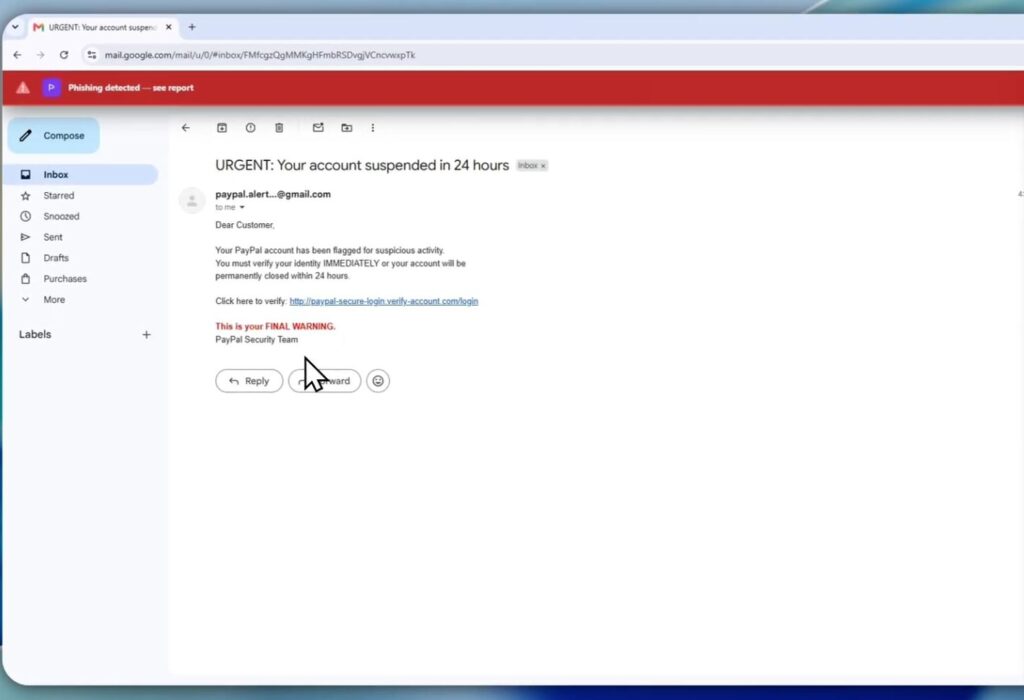
This is the single most important habit, and it’s unaffected by how well-written the email is. Check the actual sending domain, not just the display name.
Click or tap on the sender’s name to reveal the full email address. Legitimate companies send from their actual domain — notifications@chase.com, not chase-notifications@secure-mail-alerts.com or chase@gmail.com.
Watch specifically for:
- Lookalike domains:
arnazon.com(with “rn” instead of “m”),paypa1.com(with the numeral 1 instead of lowercase L),microsoft-support.net(extra words appended to a real brand name) - Mismatched domains: The email claims to be from your bank but the domain is a generic email provider or unrelated company domain
- Subdomain tricks:
account.security.amazon.com.verify-now.com— the actual domain isverify-now.com; everything before it is just a misleading subdomain structure designed to look like it contains “amazon.com”
AI-generated phishing text can be perfect, but the underlying infrastructure — the domain the email actually originates from — still has to be something the attacker controls, and that’s where the deception becomes visible.
[PRO TIP] On desktop email clients, hovering over the sender’s name (without clicking) typically reveals the full email address in a tooltip or status bar. On mobile, tapping the sender’s name usually expands to show the full address. Make checking this a reflexive habit before reading any email requesting action, regardless of how legitimate it looks.
2. URL Inspection Before Clicking (Not After)
Hover over any link in an email — desktop browsers and email clients show the actual destination URL in the bottom status bar without clicking. On mobile, a long-press (without releasing) typically previews the link destination.
What to check: does the URL’s domain match the organization the email claims to be from? A “Reset your password” link from “Netflix” that actually points to a domain that isn’t netflix.com is the signal, regardless of how convincing the surrounding email text is.
AI text generation doesn’t change where a link actually points. This remains a purely technical check that AI-generated phishing hasn’t found a way around, because the destination has to be infrastructure the attacker controls to capture your credentials.
[COMMON TRAP] Some legitimate marketing emails use link-tracking services (domains like
click.mailchimp.comorlinks.company-marketing.com) that aren’t the company’s main domain but are legitimate. This makes URL inspection slightly less black-and-white than it used to be — when in doubt, navigate to the company’s website directly by typing the known URL yourself rather than clicking the email link at all.
3. Unusual Urgency Paired With Action Requests
AI hasn’t changed the fundamental psychological tactic phishing relies on: creating urgency that short-circuits careful evaluation. “Your account will be suspended in 24 hours,” “Immediate action required,” “Unusual sign-in detected — verify now” — these framings exist specifically to make you act before you think to verify.
The presence of urgency alone isn’t proof of phishing (legitimate security alerts do exist), but urgency combined with a request to click a link, enter credentials, or transfer money is the classic combination worth treating with extra scrutiny regardless of how professionally written the email is.
4. Requests That Bypass Normal Channels
If an email asks you to do something outside your organization’s normal process — wire money based on an email alone, purchase gift cards for a “client,” share credentials via email or a non-standard portal, approve an unusual payment change — that’s a structural red flag independent of writing quality.
Legitimate organizations build approval processes specifically because email can be spoofed or compromised. A request that asks you to skip that process “due to urgency” is a common social engineering pattern that AI fluency makes more convincing but doesn’t actually need AI to work.
5. Verify Through a Separate Channel
If an email claims to be from your bank, your company’s IT department, or a colleague requesting something unusual, verify through a channel you initiate yourself — call the bank using the number on your card (not a number provided in the email), message the colleague through your company’s normal chat tool, or call IT directly rather than replying to the email or clicking any provided contact link.
This single habit defeats essentially all phishing, AI-generated or not, because it removes the attacker’s control over the verification channel entirely.
What AI-Generated Phishing Looks Like in Practice
A realistic example of what current phishing looks like, paraphrased from patterns observed in reported corporate phishing attempts:
A well-formatted email arrives appearing to be from a company’s IT department, referencing a real recent software rollout the company actually did, written in a tone matching internal corporate communications, asking the recipient to “re-authenticate” through a provided link due to a security policy update. No spelling errors. No awkward phrasing. The only available technical signals are: the sending domain is a close lookalike of the company’s actual domain, and the link destination doesn’t match the company’s actual single sign-on provider.
Nothing about reading this email tells you it’s fake. Checking the sender domain and the link destination does.
Email Client Features That Help
Most major email providers have improved phishing detection that works alongside human vigilance, not as a replacement for it:
Gmail and Outlook both flag suspicious sender domains with warning banners in many cases, though this detection isn’t perfect against sophisticated lookalike domains or newly registered domains that haven’t yet been flagged.
Outlook’s “Report Phishing” button sends suspicious emails to Microsoft for analysis and removes them from your inbox — using this consistently helps train the broader detection system, not just your individual inbox. If you’ve recently changed your Outlook password or are managing account security more broadly, the complete guide to changing your Outlook email password covers the related account security steps worth pairing with phishing awareness.
Domain-based Message Authentication (DMARC, SPF, DKIM) are technical email authentication standards that legitimate organizations increasingly implement, making it harder for attackers to send emails that appear to come from a legitimate domain. Email clients increasingly surface authentication failures as warnings, though the warning language varies and isn’t always prominent.
Building the Habit That Actually Matters
The single most protective habit, more important than any specific detection technique: never click a link or provide information based solely on an email’s content, regardless of how legitimate it looks. Navigate to the service directly (type the URL yourself, or use a bookmark you created previously) rather than clicking through an email link, whenever the email is asking you to log in, verify information, or take a financial action.
This habit makes the sophistication of the phishing email’s writing irrelevant. If you never act directly from an email link for sensitive actions, an AI-perfect phishing email and a poorly written one are equally ineffective against you.
FAQ
Can AI detection tools reliably catch AI-generated phishing? Detection tools have improved but face an inherent challenge: distinguishing AI-written phishing from AI-assisted legitimate business writing (which is increasingly common) based on writing style alone is difficult. Effective detection increasingly relies on technical signals (domain reputation, authentication failures, link analysis) rather than text analysis alone.
Are AI-generated phishing emails illegal in a different way than traditional phishing? No — phishing remains illegal under existing fraud and computer crime statutes regardless of whether AI was used to generate the content. The method of creation doesn’t change the legal classification of the underlying fraudulent activity.
Does multi-factor authentication (MFA) protect against AI phishing? MFA significantly raises the difficulty for attackers even if they successfully phish a password, since they’d also need the second factor. However, more sophisticated phishing campaigns now include real-time MFA interception (relaying your MFA code to the real service as you enter it), so MFA reduces but doesn’t eliminate risk — it remains worth using regardless.
Should I be more worried about AI phishing if I work in a security-sensitive field? Yes, proportionally. Industries handling sensitive data, financial transactions, or critical infrastructure are higher-value targets for sophisticated AI-assisted phishing campaigns specifically because the payoff justifies more effort from attackers. If security awareness training is part of your role, the broader context of how cybersecurity skills and careers are evolving is covered in how hard cybersecurity actually is, relevant if phishing defense connects to a broader interest in the field.
What should I do if I think I clicked a phishing link? Change the password for the affected account immediately from a device you trust, enable MFA if it wasn’t already active, and monitor the account for unusual activity. If you entered financial information, contact your bank or card issuer immediately. For broader account security practices beyond just phishing response, the guide to protecting your privacy online in 2026 covers password management and account monitoring that reduces damage from any single compromised credential.
Conclusion
AI eliminated the writing-quality tell that phishing detection relied on for decades — grammatically perfect, well-personalized phishing emails are now the norm rather than the exception. What remains reliable is entirely technical: checking the actual sender domain rather than the display name, inspecting link destinations before clicking, treating urgency-plus-action-request combinations with extra scrutiny, and verifying unusual requests through a channel you initiate yourself rather than one provided in the email. None of these checks require evaluating how well-written the email is, which is exactly why they still work against AI-generated phishing in a way that the old advice no longer does.
