I’ve migrated my notes three times in the past two years. Notion first, then Roam Research for about eight months, then Obsidian where I’ve been sitting for the past year. Each migration cost me a weekend of reformatting and a solid week of muscle memory retraining. I’m not switching again anytime soon — but if I were starting from scratch right now, the decision would look different than it did in 2023. All three tools have changed significantly, and the AI layer each of them has bolted on has reshuffled who they’re actually built for.
Here’s the honest version of this comparison, including the parts none of the official comparison posts mention.
Quick Answer:
- Notion is the right choice if you’re managing projects, wikis, or collaborative databases alongside notes — the free tier is genuinely functional, and the AI is the most polished of the three
- Obsidian is the right choice if you want your notes in plain Markdown files you own forever, care about privacy, and don’t mind a slightly steeper initial setup — the core is free, and paying only makes sense if you need sync
- Roam Research is the most powerful tool for networked thinking and daily notes workflows, and also the most expensive and the least forgiving for new users — it’s built for a specific type of thinker and actively annoying if you’re not that type
What’s Changed in 2026
Before getting into the comparison, the landscape has shifted enough that reviews from 2022 or 2023 are genuinely misleading now.
Notion shipped Notion AI as an integrated paid add-on, then bundled it into higher-tier plans, then introduced a limited free AI tier. In 2026, the AI writing and summarization is baked into the product in a way that changes the daily experience — it’s not a chatbot you open separately, it’s a slash-command inside any page. The database features have also matured, with Relations and Rollups that now work reliably enough for actual project tracking rather than just demo videos.
Obsidian released its Canvas feature (a spatial note-taking view), significantly improved mobile sync performance, and the plugin ecosystem has grown to the point where almost anything you want is available as a community plugin. The Obsidian AI plugins (using local Ollama or OpenAI API key) are genuinely usable now rather than experimental.
Roam Research remains the most unchanged of the three. It added some AI features (Roam Depot with AI blocks) but the core product philosophy is identical to launch. The team is small and the roadmap is slow. Whether that’s a feature or a bug depends on how you feel about software that doesn’t change.
(Tested on: Windows 11 23H2 | macOS Sonoma 14.5 | iPhone 15 Pro iOS 17.6 | Notion Personal Pro | Obsidian 1.6.x with Sync | Roam Research — all used actively across three months for a direct comparison)
Notion: The Collaborative Workspace That Learned to Take Notes
Notion started as a project management and wiki tool and retrofitted note-taking into it. That origin story still shows in how the product feels. Everything is a “page,” pages live inside pages, and the block-based editor gives you infinite flexibility at the cost of infinite decisions about structure.
The upside of that flexibility: Notion genuinely handles tasks that neither Obsidian nor Roam can touch. A client project database with linked tasks, meeting notes, invoice tracking, and a shared wiki for the team — that’s Notion’s home territory. If you’re running a small business or a team, Notion is the only one of these three tools that makes sense as a shared workspace.
The downside: your data lives on Notion’s servers in a proprietary format. The export is functional — you can export to Markdown — but the relational databases don’t export cleanly, and rebuilding a complex Notion setup in another tool is a multi-day project. You’re betting on Notion staying around and not changing their pricing in ways that hurt you.
Who Notion is for in 2026:
- Teams of 2-20 who need a shared workspace, not just personal notes
- People who want AI writing assistance built into the same tool where they write everything
- Anyone who needs databases, kanban boards, or calendar views alongside their notes
- People coming from Confluence who want something that doesn’t feel like enterprise software from 2009
Notion pricing reality: The free tier allows unlimited blocks but limits collaboration and history. Notion’s Plus plan at $8/month (annual) or $10/month (monthly) is where it becomes a proper personal workspace with version history and more file uploads. The AI add-on costs extra unless you’re on Business tier. For a solo user doing primarily personal note-taking without team features, the free tier covers most of it — but you’ll hit the guest collaboration limit quickly if you share anything.
[COMMON TRAP] Notion’s AI summarization runs your page content through OpenAI’s API. If you’re taking notes on anything sensitive — client information, personal health data, confidential business strategy — every AI-assisted summary or generation sends that content to a third-party server. Notion’s privacy page covers this, but it’s not something the product makes obvious.
Obsidian: The Local-First Option That Rewards the Investment
Obsidian stores everything as plain Markdown files on your local drive. Not in a database, not in a proprietary format, not in the cloud unless you specifically enable sync. This is the thing that makes it completely different from Notion and Roam at a philosophical level: if Obsidian stopped existing tomorrow, you’d open your vault folder in any text editor and every note would be readable. That durability changes how you feel about building a knowledge base in it.
The learning curve is real but front-loaded. Setting up Obsidian from scratch — choosing a vault structure, deciding which community plugins to use, configuring the sync if you want it across devices — takes a few hours. After that initial investment, the daily experience is fast and low-friction. The editor is snappy in a way Notion isn’t, especially on mobile.
The plugin ecosystem is the other differentiator. Community plugins for Obsidian include: Dataview (SQL-like queries across your notes), Templater (programmable note templates), Tasks (task management across files), Kanban (board view over Markdown files), and dozens more. You can build something that looks remarkably like Notion’s database features using Dataview + Templater, but it takes configuration time.
Who Obsidian is for in 2026:
- People who care about data ownership and don’t want their notes on anyone else’s server
- Writers, researchers, and developers who live in Markdown already
- Anyone building a personal knowledge base for the long term who wants durability
- Privacy-conscious users who want to run AI features locally via Ollama rather than through cloud APIs
Obsidian pricing reality: The core app is free forever for personal use. Obsidian Sync — their cloud sync service — costs $4/month (annual). This is the only thing most solo users need to pay for. Obsidian Publish (for publishing notes as a website) is $8/month separately. If you self-host sync through iCloud, a shared folder, or Syncthing, you pay nothing at all. I’ve been running Obsidian Sync for the past year and it’s genuinely reliable — but the free Syncthing route works if you’re comfortable with the setup, which is covered in SaaS fatigue: open-source tools that replace expensive subscriptions.
[PRO TIP] Before deciding you need the Dataview plugin to manage tasks or track projects, try the core Obsidian Tasks plugin first. It’s simpler, requires no query syntax, and handles 80% of what people think they need Dataview for. Dataview is powerful but has a learning curve of its own.
Roam Research: The Networked Thinking Tool That Doesn’t Compromise
Roam Research is built around a single idea: every note should be able to link to every other note, and those links should be bidirectional so you can see all the places where a concept appears. This “graph” model of knowledge is genuinely different from the hierarchical folder structure every other note-taking app uses.
In practice, Roam pushes you toward a daily notes workflow. Every day gets a page. Everything you write goes on today’s page, tagged with the topics it relates to. Over weeks, the graph of connections between topics builds up automatically. Looking at the graph view of your Roam database after six months of consistent use is genuinely impressive — clusters of ideas you didn’t know were connected, threads that run through months of work.
The problem: Roam is $165/year and that price has stayed constant since launch. For that price, you get a tool with a slower release cadence than Notion or Obsidian, a mobile app that’s functional but not polished, and a learning curve that trips up users who try to apply conventional folder-based note-taking habits to it. Roam works best if you genuinely embrace the daily notes + linking workflow. Used halfway, it’s just an expensive outliner.
Who Roam is for in 2026:
- Researchers, academics, and people doing literature review or synthesis work across many sources
- People who have already tried Notion and Obsidian and found them too structure-dependent
- The “building a second brain” methodology crowd who wants the tool purpose-built for it
- Anyone willing to spend two weeks genuinely learning the tool before judging it
Roam pricing reality: $165/year, no free tier (there’s a 31-day trial). No monthly option. If the daily-notes linking workflow clicks for you, the price is justifiable. If it doesn’t click within the first month, you’ve paid for something that won’t suit you. I’d genuinely recommend trying Logseq (a free, open-source Roam alternative with near-identical functionality) before committing to Roam’s price — if the Logseq workflow works for you, Roam’s networked thinking model works for you, and then you can decide if the UX difference justifies the cost.
The AI Features: Where Each Tool Actually Stands
Since all three have added AI in 2026, comparing the actual AI is now relevant to the buying decision.
Notion AI is the most integrated. It lives in the slash-command menu, can summarize pages, generate content, translate, and answer questions about your workspace. The quality is on par with a mid-tier GPT-4 implementation — good enough for drafting, summarizing meeting notes, and extracting action items. It sends your content to OpenAI’s API, so the privacy considerations from earlier apply.
Obsidian AI is entirely plugin-based. The most capable option is the Smart Connections plugin, which creates a local embedding of your notes and lets you chat with your knowledge base using either OpenAI’s API or a locally-running Ollama model. The local Ollama route keeps everything on your machine — no content leaves your computer. Quality with a well-tuned local model (Llama 3 8B works well) is noticeably below GPT-4 for complex reasoning but perfectly adequate for summarizing and finding connections in your own notes. For a full guide on setting up local AI on your PC, how to run local AI for data privacy covers the setup in detail.
Roam AI through Roam Depot is functional but less polished than the other two. The daily notes summarization works well. The general AI query interface is decent. It’s not the reason to choose Roam over the others.
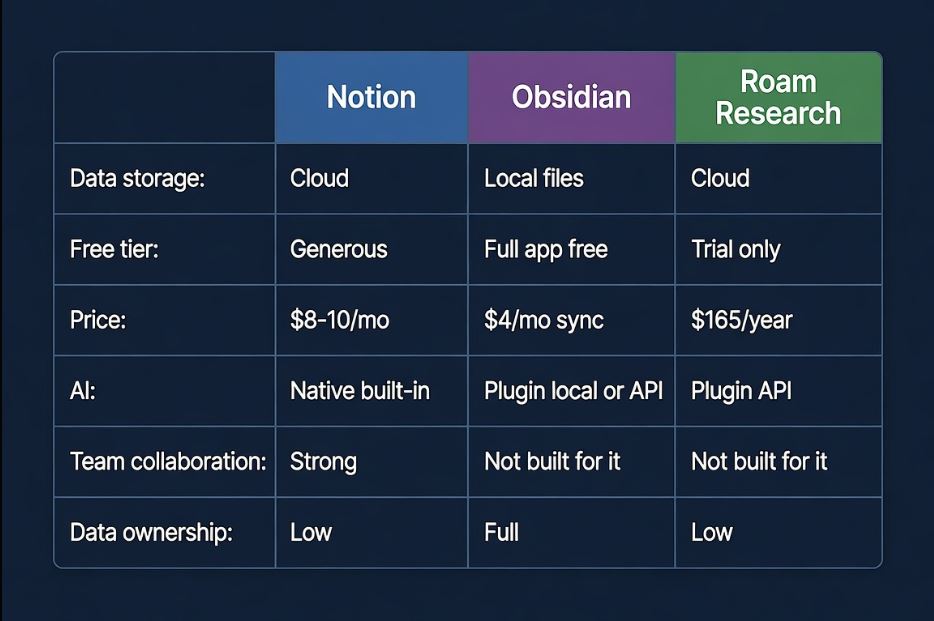
The Comparison Table
| Factor | Notion | Obsidian | Roam Research |
|---|---|---|---|
| Data storage | Cloud (Notion servers) | Local files + optional sync | Cloud (Roam servers) |
| Export quality | Good (Markdown), DB limited | Perfect (native Markdown) | Acceptable (EDN/Markdown) |
| Free tier | Generous | Full app free | 31-day trial only |
| Paid price | $8–10/month | $4/month (Sync only) | $165/year |
| Mobile quality | Good | Good (improved 2025) | Functional |
| Team collaboration | Strong | Not built for it | Not built for it |
| AI integration | Native (OpenAI API) | Plugin (local or API) | Plugin (API) |
| Learning curve | Low-Medium | Medium | High |
| Data ownership | Low | Full | Low |
| Plugin ecosystem | Moderate | Extensive | Small |
| Best for | Teams + projects | Personal knowledge base | Networked thinking |
Who Should Use What
Use Notion if: you’re managing a team workspace, you want databases and kanban boards alongside notes, you value polish over data ownership, and you want AI that works without setup.
Use Obsidian if: you write in Markdown, you want your notes in files you own forever, privacy matters to you, and you’re willing to spend a few hours on initial configuration in exchange for never worrying about your data.
Use Roam if: you’ve already tried other tools and found them too hierarchical, you’re doing research or academic work that involves synthesizing many sources, and you’re committed to the daily-notes workflow that makes Roam’s linking model actually useful.
Use Logseq instead of Roam if: you want Roam’s model but not Roam’s price — Logseq is free, open-source, and stores notes as local Markdown files.
Troubleshooting
I switched from Notion to Obsidian and my notes look broken
Notion’s Markdown export includes HTML inside the Markdown for certain formatting (callouts, toggles, colored text). Obsidian reads standard Markdown but will display the raw HTML tags for Notion-specific elements. The Importer community plugin for Obsidian handles Notion exports specifically and cleans up most of these formatting issues automatically — install it from Obsidian’s community plugins list and run it on your exported Notion folder.
Obsidian Sync shows conflicts constantly across devices
This usually happens when two devices edit the same note offline and then both try to sync. Obsidian Sync creates conflict copies rather than overwriting — look for files ending in (conflicted copy) in your vault. The pattern: always let sync complete before closing the app on one device and opening on another. Enabling “Sync on startup” and “Sync on quit” in Obsidian Sync settings reduces conflicts significantly.
Roam feels slow and overwhelming after one week
This is normal and is usually a sign of trying to use Roam like a traditional note-taking app. The key shift: stop creating pages for every topic immediately. Let the daily notes workflow run for two weeks, tag everything with double brackets [[topic]] as you write, and only visit the graph view at the end of that period. The links build naturally when you don’t force the structure.
FAQ
Can I use all three tools for different purposes? You can, but the overhead of maintaining notes in multiple systems typically outweighs the benefits. The most common sensible split: Notion for team/project work, Obsidian for personal knowledge. Roam alongside either of those adds more friction than most people want.
Which tool is best for students? Obsidian with the free core app handles most student use cases — literature notes, flashcard integration via Anki plugin, longform writing. Notion’s free tier is also genuinely good for students managing course wikis and project deadlines. Roam is rarely the right starting point for students new to note-taking systems.
Is Logseq really a free alternative to Roam? For most use cases, yes. Logseq uses the same daily-notes + bidirectional linking model as Roam, stores notes as local Markdown files (better than Roam for ownership), and is actively maintained. The main areas where Roam still edges it: UX polish and the speed of the block editor.
What happened to Notion’s offline mode? Notion has improved offline support significantly since 2023 — you can now work offline and changes sync when reconnected. It’s still not as seamless as Obsidian (which is entirely local-first) but it’s no longer the complete deal-breaker it was in earlier versions.
Do these tools work on Linux? Obsidian has a native Linux app and works excellently on Ubuntu, Fedora, and other distributions. Notion runs in a browser on Linux (no native app but the web version is fully functional). Roam is entirely browser-based and works on any OS with a modern browser.
Conclusion
If you’re new to personal knowledge management tools, start with Notion’s free tier or Obsidian’s free core — both have zero financial risk. Notion wins on collaboration and database features; Obsidian wins on data ownership, privacy, and long-term durability. Roam is for a specific workflow that not everyone clicks with, and at $165/year, it’s worth trying Logseq first to confirm the model suits you before committing. The AI features are now meaningful enough to factor in: if you want AI that works with no setup, Notion. If you want AI that never sends your notes to a cloud server, Obsidian with a local Ollama setup.
