I ran both tools in parallel for six weeks across the same meetings — client calls, internal standups, and one-on-ones — and took notes on where each stumbled. The marketing on both sides is aggressively optimistic about what “free” includes. The reality is more nuanced: one tool’s free tier is genuinely useful for a specific type of user, and the other’s is designed primarily to get you to upgrade within your first week. Here’s what I actually found.
Quick Answer:
- Fireflies’s free tier offers more storage (800 minutes all-time) and doesn’t cut off individual meeting transcripts mid-session — its constraint is AI credits running out fast and a bot that some platforms flag as a security risk
- Otter’s free tier is harder to work around — the 30-minute per-meeting cap and 3 lifetime file imports make it genuinely unusable for standard-length meetings and any offline recording workflow
- For light individual use (1-2 short meetings per week), Fireflies free is the better long-term free option; for anyone who regularly attends 45-60 minute meetings, neither free tier is sustainable
What Each Free Tier Actually Includes in 2026
Before getting into the comparison, the specific numbers matter because both companies present their limitations in ways that obscure the practical reality.
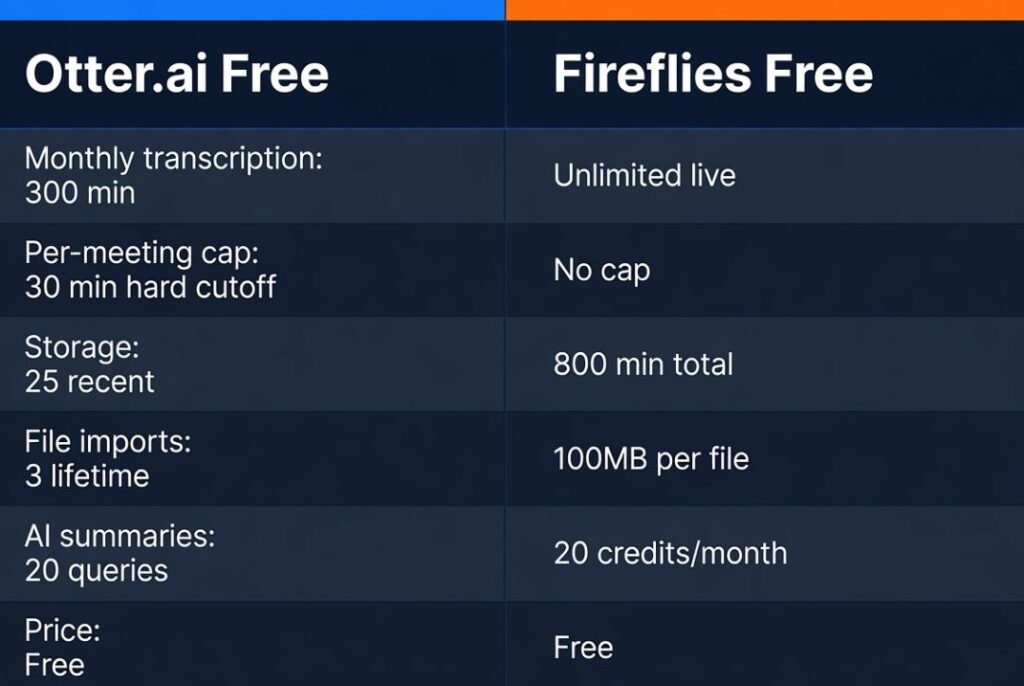
Otter.ai Free (Basic):
- 300 minutes of transcription per month (no rollover)
- 30-minute cap per individual meeting or file — if your meeting runs longer, the transcript stops at 30 minutes even if the recording continues
- 3 file imports total, for the lifetime of the account (not per month — ever)
- Only 25 most recent conversations visible
- AI summaries and chat limited to 20 queries per month
- Export: text and MP3 only
Fireflies Free:
- Unlimited transcription for live meetings (no monthly minute cap for bot-joined calls)
- 800 minutes of total storage per seat (all-time, not monthly — once full, delete old meetings to make room)
- 20 AI credits per month for advanced features (AskFred queries, advanced summaries)
- File uploads: up to 100MB and 150 minutes per file
- All integrations listed as available, though some CRM integrations require Business tier
- No video recording on any tier below Business
The framing difference: Otter gives you more visible “minutes” upfront (300/month sounds better than 800 total) but cripples usage with the per-meeting cap. Fireflies gives you unlimited live transcription but constrains how much you can store before you’re managing a rotating archive of deleted meetings.
(Tested across six weeks: Google Meet, Zoom, Microsoft Teams | MacOS and Windows | all free tier accounts)
Transcription Accuracy: Where Both Surprised Me
Both tools have improved significantly over the past two years, and for clean audio in a standard video call environment, both are genuinely good.
Otter handled speaker identification better in smaller meetings (2-4 people). It learned voice profiles after a few sessions and attributed quotes correctly more consistently than Fireflies in direct comparisons. It also produces a more readable transcript layout with clearer paragraph breaks and highlighted keywords during the meeting rather than only post-call.
Fireflies handled large group meetings more gracefully — 8-10 person calls where speakers frequently interrupted each other produced cleaner Fireflies transcripts than Otter transcripts in my testing. The action item extraction was also more consistent, surfacing follow-up tasks even when they were phrased indirectly (“let’s get that done by Thursday” was caught by Fireflies but missed by Otter in the same meeting).
Both tools struggled with strong accents, heavy technical jargon not in their custom vocabulary, and any environment with background noise. The accuracy gap between the two was smaller than the marketing suggests — in controlled conditions, both are 85-95% accurate; in real-world noise conditions, both drop to 70-80%.
[COMMON TRAP] Accuracy figures in marketing materials are measured in ideal conditions. Test both tools in your actual meeting environment before committing — the difference between a clean home office setup and a noisy co-working space is significant for both tools.
The Practical Usage Math
The numbers above become more concrete when you apply them to real usage patterns.
If you attend two 45-minute client calls per week:
With Otter free — each call is cut off at 30 minutes of transcript. You lose the last 15 minutes of every client meeting. At 4 calls per month, you’re using 120 of your 300 monthly minutes but missing the end of every call. This is essentially unusable for professional use.
With Fireflies free — both calls are fully transcribed. Monthly storage consumption: roughly 360 minutes (2 calls × 45 minutes × 4 weeks). You’d exhaust your 800-minute total storage after roughly 2 months of use, at which point you’re deleting older transcripts to keep recording new ones.
If you attend five 15-minute standups per week:
With Otter free — 300 minutes/month handles four standups per week comfortably. The 30-minute cap doesn’t apply because standups are shorter. This is actually a reasonable use case for Otter free.
With Fireflies free — 5 standups × 15 minutes × 4 weeks = 300 minutes/month. At this pace, your 800-minute storage lasts about 2.5 months. Manageable with some archive maintenance.
The pattern: Otter free is viable for short, frequent meetings. Fireflies free is viable for longer meetings where you can tolerate ongoing archive management. Neither is designed as a long-term free solution for professional use.
The Bot Problem: Fireflies’s Google Meet Issue
One thing that doesn’t appear prominently in Fireflies’s marketing: Google Meet has started flagging third-party AI notetaker bots as security risks, and Fireflies joins calls as a visible bot. For organizations using Google Workspace with certain security policies enabled, Fireflies simply cannot join Google Meet calls — the bot gets rejected.
If your team runs primarily on Google Meet, test this before adopting Fireflies. The bot joining from an external account triggers Google’s safety warnings in some workspace configurations, which can result in the bot being removed from the call automatically or users being warned that an unknown participant has joined.
Otter’s Google Meet integration works differently — it uses a browser extension that records locally rather than joining as a separate participant, which avoids the bot-rejection issue. This is a meaningful practical advantage for Google Meet-heavy users.
[PRO TIP] Before committing to either tool, have a test meeting with a colleague and have them screenshot whatever notification appears on their end when your AI note-taker joins. “An AI is recording this meeting” notifications affect trust differently depending on your context — sales calls, HR discussions, and external client meetings have different norms around disclosed AI recording.
AI Summary Quality: Where the Real Difference Sits
Both tools generate meeting summaries, but the quality difference is meaningful.
Otter’s summaries on the free tier are brief and structured — they identify main topics and key points but are fairly generic. The AI chat feature (asking questions about the transcript) is limited to 20 queries per month on free, which disappears quickly if you use it regularly. The summaries are more readable than Fireflies’s default output but contain less actionable information.
Fireflies’s summaries pull out action items, decisions made, and next steps more aggressively. The “AskFred” feature (their AI query interface) depletes the 20 monthly AI credits quickly — each AskFred query costs credits, as do AI summaries. Once credits are gone, you have transcripts but no AI processing of them until the next month. This is the most significant free tier limitation that Fireflies marketing obscures.
The credits constraint means Fireflies’s free AI features work for roughly 4-6 meetings per month before the AI processing stops. After that, you have raw transcripts without summaries or extracted action items.
Integration Depth: Fireflies Wins Clearly
Both tools claim broad integration support, but the practical depth differs.
Fireflies connects to Notion, Slack, Salesforce, HubSpot, Asana, Trello, and dozens of other tools with actual two-way data flow on higher tiers. On the free tier, basic integrations (calendar sync, Slack notifications) work, but CRM integrations require Business tier.
Otter integrates with Zoom, Google Meet, Teams, and Slack more reliably for basic meeting joining and transcript sharing. Deeper integrations — exporting to project management tools, CRM sync — are limited on free and less developed than Fireflies even on paid tiers.
If you’re thinking about how either tool would fit into a broader productivity stack — particularly if you use a CRM — the CRM software plain English explanation covers what to look for in CRM integration depth, which is relevant if Fireflies’s Business tier CRM sync is part of your evaluation.
Privacy: What Happens to Your Meeting Data
Both tools process your audio on their cloud servers, which is the standard model for AI transcription. Neither offers local processing on the free tier.
Otter stores recordings and transcripts on AWS servers in the US. The free tier deletes conversations after the 25-most-recent limit, but transcripts remain in Otter’s systems for a period after deletion. Otter’s privacy policy allows using anonymized data for model training unless you opt out — this setting exists in account preferences but isn’t prominently surfaced.
Fireflies stores data on AWS and Google Cloud. The privacy policy similarly allows using meeting data for model improvement. The bot-based recording model means the audio is captured at Fireflies’s server level, not locally — a distinction that matters in regulated environments.
For meetings where confidentiality matters — legal discussions, HR conversations, sensitive client calls — neither free tier is appropriate without reviewing the privacy policy carefully and potentially using a paid enterprise tier with explicit data handling agreements. The broader context of evaluating which data your productivity tools send to third-party servers is covered in how to protect your privacy online in 2026.
The Comparison Table
| Feature | Otter Free | Fireflies Free |
|---|---|---|
| Monthly transcription | 300 min/month | Unlimited (live meetings) |
| Per-meeting cap | 30 min (hard cutoff) | No cap |
| Storage | 25 most recent | 800 min all-time |
| File imports | 3 lifetime | 100MB / 150 min per file |
| AI summaries | Limited | 20 AI credits/month |
| Google Meet bot | Extension (no bot rejection) | Bot (may be flagged) |
| Integration depth | Basic | Broader (CRM on Business) |
| Pricing (paid) | $8.33/month (annual) | $10/month (annual) |
Who Should Use Each
Otter free is better for:
- Users who attend only short meetings (under 30 minutes consistently)
- Students transcribing lectures or short study sessions
- People who want to try AI transcription before committing to any tool
- Google Meet users who can’t use a bot-based solution
Fireflies free is better for:
- Anyone who regularly attends meetings longer than 30 minutes
- Users who need action item extraction more than AI chat
- Teams where some members can share storage and AI credits
- Users who don’t mind managing a rotating archive of stored meetings
Neither free tier is suitable if:
- You attend more than 2-3 significant meetings per week
- You need to reference meetings from more than 2 months ago reliably
- You work in a regulated industry with data handling requirements
- AI summaries and AskFred queries are central to your workflow rather than optional extras
In those cases, both tools’ paid tiers are reasonably priced — Otter Pro at $8.33/month and Fireflies Pro at $10/month — and both become significantly more useful. If even the paid tier feels like a subscription you’d rather avoid, the SaaS fatigue open-source alternatives guide covers self-hosted transcription options that skip the per-month cost entirely.
FAQ
Can I use both tools simultaneously? Technically yes — run Otter’s browser extension in one window while Fireflies’s bot joins the same call. In practice this creates transcript duplication and the combined AI credit limits mean you’re still hitting walls. Pick one and stick with it.
Does Fireflies’s “unlimited” transcription on free actually mean unlimited? Unlimited refers to the number of meetings you can join and transcribe live — there’s no monthly minute cap for live recordings. The constraint is storage: 800 minutes total. Once full, new meetings stop recording until you delete old ones.
Is the 30-minute Otter cap per session or per day? Per session. Each individual meeting or file import is capped at 30 minutes of transcript. You can have ten 30-minute sessions in a day and get 300 minutes total — but no single session can exceed 30 minutes. For an hour-long meeting, you get the first 30 minutes only.
Which tool is better for non-English speakers? Both support over 100 languages, but accuracy varies by language. Fireflies’s multilingual support is more consistently mentioned in user reports for languages beyond English, particularly for European languages. For Asian languages, accuracy drops significantly on both tools. Test in your specific language before adopting either.
Do these tools work for in-person meetings (not video calls)? Both have mobile apps that can record in-person audio and transcribe it. Otter’s mobile app handles this reasonably well. Fireflies is more optimized for video call integration. For pure in-person recording, Otter has a slight edge in the mobile app experience.
Conclusion
Between the two free tiers, Fireflies comes out ahead for most professional use cases purely because it doesn’t hard-cut transcripts mid-meeting. The 800-minute all-time storage is a real constraint, but it’s manageable with periodic cleanup — the 30-minute per-session cap on Otter is not manageable if you attend standard-length meetings. That said, the AI credits depleting quickly and Google Meet’s bot-flagging behavior are genuine limitations that Fireflies doesn’t advertise prominently. Both tools are designed to get you to upgrade; the question is which free tier stays useful the longest before you hit a wall you can’t work around.
